Wednesday, July 22, 2015

Publishing in the 21st Century

I always found that one of the core features or tasks of a publisher it to spend money made with best-selling artists on the newcomers. This applies both to publishers of music (a.k.a. labels) and literature.
Call it a cross-subsidy (and yell fire if you are too neo-liberal for this).

Over the last decades it appears that this is no longer the case.  
It seems that corporate financial controlling measures are being applied to each author or book of its own (or artist/album), and if it can not turn a profit, it will not be published. Profits from say Harry Potter [1] stay with the Harry Potter team and division and are not invested to find the next promising author.
That's because everyone hates cross-subsidies. Even within one company.

I especially find this is the case in music:
Take the recent rant of Taylor Swift against Apple. She complained (whether rightfully or not) about the fact Apple will not pay the artists during the 3 months trial period, because they, Apple, themselves don't receive any money.[2] Let's for a second ignore whether this is fair or not, let's turn to a separate aspect:

Taylor Swift claimed in her open letter to Apple that she's is not complaining for herself (as she gets enough money) but for the young / indie artists:
This is not about me. Thankfully I am on my fifth album and can support myself, my band, crew, and entire management team by playing live shows. This is about the new artist or band that has just released their first single and will not be paid for its success. ...
So is she asking Apple to take on the role of a publisher? She is asking them to help (i.e. finance) the young artists. Shouldn't the labels be doing this with the revenues they already make?
Interestingly she does not mention that this could be done out of the revenue streams from her music, only from the young artists themselves. That's odd.

So this is only a little less greedy than actually asking for herself - as she claims this is not doing.
Not so philanthropic after all.

Where are the publishers or labels in all of this? By taking themselves totally out of this equation, they will get by-passed in the future. Why would anyone need a publisher, when they don't even fulfill one of their core tasks? What's the value of a label/publisher to a young artist?

Instead of greedily clinging to their old business model, which is falling apart, they should think of creating new and relevant offerings to their customers, i.e. the artists.


--
[1] I admit I have done the research on this author/book/publisher, I just use it as an example. Correct me in the comments if I'm wrong.
[2] Apple of course changed this after her open letter.

Saturday, July 18, 2015

Yahoo Pipes no more...

So, Yahoo decided to pull the plug on one of their most interesting services: Yahoo Pipes.

So I revisited the service as long as it is still there. Turns out, the only 2 cases where I'm still using Pipes is for aggregating and filtering RSS feeds.

So I will look into one of the alternatives now, as listed here for example. 

Thursday, July 09, 2015

Quick Perl Hack

My regular commute train quite frequently has a delay of somewhere between 3 and 8 minutes, which is annoying when you really hurry up in the morning to be sure to catch it - it's only a 6min walk or so -  and then you notice that all the rush was in vain, because the train wont be there for the next 5 minutes.  But then again, you can't rely on it being late...

Wouldn't it be nice to already know this at home?
Well luckily on the website of our Austrian Federal Railways (ÖBB) and in their mobile apps you can watch the "Station monitor" as they call it. That is, you get almost the same screen display as the have in the station, with the delays showing - if any.

However, that would require 2 taps on my mobile .... way too cumbersome for me.

So I put together a quick Perl hack, just to stay in shape.
First analyze the webpage and the actual Ajax call in the background.
Then so some lenient JSON parsing, fix three stupid perl mistakes I managed to make within 1 hours. Filter on the train that I actually want, and send a PushBullet notification to my mobile and schedule this through cron on my QNAP for 8am every morning. Just in time to let me know whether I would need to speed up or not.

That was yesterday.

This morning, though, I of course did not get any notification, because I forgot the proper use lib ... in my perl script, so it would pick up my personal PushBullet library. Which of coursed worked during testing yesterday, because I was in another working directory. Will I ever learn?!

And at the same time I learned from my wife, that she is taking an earlier train this summer, so while I was at it, I updated the script to monitor 2 trains (with only 1 notification).

Should work fine now... But let's see tomorrow morning.

Saturday, June 13, 2015

Vertical Video

The other day I was browsing the Internet Trends 2015 presentation by Mary Meeker from this year's Code conference (and I urge you to do the same).

Out of all the excellent observations and predictions, one especially caught my attention: Something Funny Happened on the Way to the Small Screen ... Small Screen Vertical Viewing Became Big Deal. (Slides 22ff).


Video buffs and know-it-alls (like me, ahem) always frown upon iPhone/Smartphone users recording (and posting) portrait/vertical video. "Look at those stupid idiots", we yell, "they don't even know that video is supposed to be landscape. Don't they know anything?" Bruhaha.

Well, bruhaha ourselves.

Where does it say that video has to be landscape? Just because the cinematic/theatrical screen was horizontal, and (almost all) PC screen are? Soon the majority of viewing devices can now be either - horizontal or vertical, like tablets and smartphones. And the phone is even more likely to be held in portrait mode (the tablet less likely). See the data in the presentation.

If content producers and designers focus on this as a design element, this can be a competitive advantage.

Saturday, May 23, 2015

FlickrTab for Chrome

How about an extension for the Chrome Browser that does nothing for your productivity, almost the opposite: Flickr Tab


All it does: it will show a photo from flickr every-time you open a new (empty) tab on Chrome. That's it.
No productivity value at all. But you get to see truly awesome pictures.
I installed it a couple of weeks ago when it first was released, and enjoyed it ever since.

Thursday, April 16, 2015

Moto 360 first experience

A couple of weeks ago, I got a Moto360 Android watch/wear, and by now I have been trying it out in daily life, Here's how that works / worked:

One disclaimer, though: A couple of days after I got it, I went on a short London vacation/trip (with the family), and I deliberately decided to leave my Moto360 at home... On the second day in London I started to regret this...


1. In the morning I start wearing it just before I leave home and start my commute (a couple of minutes walking, traind and underground).
Here I mainly use it for reading (and dismissing) notifications, like incoming emails and sms/text.
Responding to a text is really not an option, or do you want to talk to your watch while on the underground (unless you are Dick Tracy)

Podcast player control (BeyondPod in my case) works like a charm.

2. Then a full office day with internal and external meetings and coffee breaks. Again, mostly reading and dismissing. Also, the reminders about upcoming meetings are nice.

During the coffee breaks, the most important use case is showing it to co-workers... I hope that wears off.

Regarding calls (regardless when), the watch of course only helps, to see who's calling, and more smoothely reject the call. When you want to take it, you still need the phone.

3. Commute back - see above,
Swarm/Foursquare check-ins - if you are really still into that, like I am - work quite fine with Wear for Swarm.
The Minimal & Elegant watch face I started using today 

4. Once I get home, the battery is usually still around 40%.

5. In front of the telly ... yeah, that's the only time I really dare talk to the device. Works quite well, as long as you stick to English.

Even though Google (on the phone) has no problem with switching between German and English dication, on the Moto360 I only got it to work with English. 

So some text/chat replies do still not work (when I'm in a German conversation), or I start responding with "Thanks" instead of "Danke" :)

I did manage to have quite complete chat conversations just using dictation through the watch. More than just "Thanks".


6. In the evening, I put it in the charging station on my nightstand and the watch now doubles as an alarm clock, and gets charged at the same time.


The biggest problem so far interestingly occured during the night: a couple of days ago, the Wear app on the Moto 360 itself crashed, and kept crashing, even after rebooting the watch [1]. Which was indeed annoying because my newly enthroned alarm clock kept flashing bright wite every 3 minutes (while it kept crashing and restarting). So I just switched it off, tried to re-synch all apps in the morning. That still did not fix it, so I did a full reset and re-paired the watch. Works fine now.


Impression and experience so far: Totally nice piece of art (and technology), which works extremely well. Battery is a lot better than expected. Proper use-case worth 200+EUR: none so far

--
[1] There, I said it "Rebooting the watch"... How dorky/nerdy is that. Just shoot me.

Saturday, April 11, 2015

LastPass - a must

It's really that simple:

Using the same password for each and every site or webservice is just not an option:
a) because of different and incompatibly password rules and policies
b) for simple security reasons.
If one site gets hacked and passwords leak (and it will and they will) then those nasty nasty people will have access to all (or many) of your accounts.

Creating (much less remembering) 100 separate and secure passwords in your head simply wont work.
So you need a service to do this for you.

I choose LastPass some time ago, and it works great, especially the random password generator, and the auto-fill feature on web-sites and Android apps.

I know, some will say, that LastPass can get hacked and then all my accounts (incl online banking and all) are revealed. True. But still more unlikely than all the other scenarios.

As of today this is the most secure choice for me.

There are others like 1Password, or Apple's key chain... (here's a list).  If you don't yet have any of those, get LastPass now.

Wednesday, April 08, 2015

Bluetooth beats Wifi

The other day - when  I was on the train to Prague - I needed to get some work done on my iPad, but the WiFi on the train was dead. Usually then, I enable the hotspot on my Android phone, but this time I decided to finally try this over Blueooth.

I wanted to do this a long time ago already, but the Wifi was too easy.

So, what can I say... it is almost as easy (of course), but uses a lot less energy, both on the iPad and more importantly on the Nexus 5.

I guess, I'll keep it like that. Bluetooth tethering definitely beats Wifi tethering.

Tuesday, April 07, 2015

Public Ads for the Amazon Store

In Android-Land the amazon app store is this mythical creature... romoured to exist, but not a lot of people have actually seen it ... except - of course - if you are a Fire user. An even rarer and more mythical creature then :)

So I was quite surprised last week on the London tube to see Amazon being advertised for an app right next to the Apple App Store and Google play.


Saturday, March 28, 2015

Moto 360

I've been playing with the idea of getting an Android Wear smart watch for some time now. Specifically I had set my mind on the Moto 360, and luckily a dear friend of mine (and fellow geek) owns one. So after a brief intro (over some beers) I was even more inclined to get one. Then one of our local discount retailers (Hofer) had it on offer, and more or less at the same time it has been offered at quite a reasonable price on eBay (including some additional watch bands).

So I got it from ebay. Yesterday it arrived.
Ok, the unboxing is less spectacular with a pre-owned device, but still nice.
Charge the watch, install the Android Wear app from the play store and follow the instructions.

First thing I did, was send a text to my son (who was clogging the DSL line again) via the voice dictation on the watch. Boy, did I triple check this before sending :) But it worked flawlessly.

Half an hour later I was conducting a Facebook Messenger chat partially from the watch...
Why? Because I could.... (and I needed to test it).

And then, just for the fun of it, I told my watch to play some music on the phone. Soooo cool.


So, over the next couple of days I hope to find some more meaningful use cases.
One thing I really hope for, is that I can keep my phone in my pocket when I receive a text or any other notificaiton while I'm on the train/commute... Let's see how that works out.

And, oh,  thanks, Max, for making me do this.

Thursday, March 26, 2015

Android Automatic WiFi Login - no more

One of the most useful Android apps - Wifi Web Login - stopped working with Android 5.0/Lollipop. The reasons seems to be that Lollipop now continues to use the mobile data (3G, ...) connection if fails to connect to the internet through wifi.

So whenever you are connected to a (public/free) hotspot, which requires a web login (or just acceptance of their terms of service). Android will ignore the Wifi, until you login/accept.

Actually, a good move.
But it seems to break Wifi Web Login, which automated this for me anyway...
Now I'm back to logging in manually...
Still easier than before, because I only have to drag down the Wifi notification, and accept the ToS for some standard hotspots.
But sort of a step back.
Hopefully this will get fixed, but neither the webpage nor the play store hint towards a fix.


Thursday, February 26, 2015

Java updates without Ask Toolbar

One thing that has annoyed me, since Sun started this, was that the Java Installer / Updater would not only have crapware like the Ask Toolbar, but also - of course - have this selected by default.

I always found it inappropriate for a large IT vendor like Sun to include such intrusive sponsoring.
Especially with a security sensitive thing like Java.

Anyway, I just learned that you can turn this off.. Not sure since when.
In the Java Options (Windows Control Panel -> Java) on the Advanced tab, scroll down to the bottom, and there you have it.

Suppress sponsor offers when installing or updating Java.

Quite hidden, and not easily found by exactly those average Joe Users who would actually install the Ask toolbar ...
But ... eh... thanks ?


Friday, February 06, 2015

Google Glass is not dead

Now that everyone rushes to tell us how they always knew that Google Glass had been doomed to fail from the very beginning, I just want to note here, that I'd like to revisit their claim in 1 to 1.5 years.
My guess is, they will look pretty stupid.

Thursday, January 01, 2015

Android Screeen Recording

While I was trying to access my broken Nexus 5, I managed to get keyboard/mouse/touch access via the debug bridge (adb), but from time to time I had serious problems actually reading certain parts of the the screen (broken display!).

So I checked if and how I can do screen recordings, and found that it works really easy. At least starting with KitKat.

Fully documented on the official adb pages.

Of course you need USB debug access to your phone, but you do not need root access (!).

So all you need is a terminal/shell and then you can do start screenrecord.

Like:

adb shell screenrecord /sdcard/test.mp4
and stop it with Ctrl-C

and then get the file to your PC with
adb pull /sdcard/test.mp4
and remove it on the device with
adb shell rm /sdcard/test.mp4.


And this is the video, showing at first nothing (display off), then I switched the device on and then I swiped up to unlock:


There are some useful options available:
OptionsDescription
--helpDisplays a usage summary.
--size <WIDTHxHEIGHT>Sets the video size, for example: 1280x720. The default value is the device's main display resolution (if supported), 1280x720 if not. For best results, use a size supported by your device's Advanced Video Coding (AVC) encoder.
--bit-rate <RATE>Sets the video bit rate for the video, in megabits per second. The default value is 4Mbps. You can increase the bit rate to improve video quality or lower it for smaller movie files. The following example sets the recording bit rate to 6Mbps:
screenrecord --bit-rate 6000000 /sdcard/demo.mp4
--time-limit <TIME>Sets the maximum recording time, in seconds. The default and maximum value is 180 (3 minutes).
--rotateRotates the output 90 degrees. This feature is experimental.
--verboseDisplays log information on command line screen. If you do not set this option, the utility does not display any information while running.
If especially like the --time-limit for short recordings.

Wednesday, December 31, 2014

... and how to restore it

As noted a couple of days ago, I broke my Nexus 5 and managed to get a backup via adb.

Finally, UPS managed - as usual with their second attempt and one call in between - to deliver the new Nexus 5 yesterday.
So, unbox, switch on, log into Wifi, etc etc... and have the system update to 4.4.3.

What?!?
Say Again!

"... and have the system update to 4.4.3."
No matter how often I repeat this, it's still weird that a brand new Nexus 5, ordered and shipped directly from Google, comes with 4.4.2 the end of 2014.

Anyway, update to 4.4.3, reboot, update to 4.4.4, reboot, update to 5.0....
Nope.
No 5.0. No Lollipop. As we know, rechecking every 5 seconds for an Android over-the-air update is as useful as hitting the elevator call button 10 times.

Well, so enable developer options with the 7x tap on the Build Number. Enable USB debugging.
Connect to PC, authorize, find the device with "adb devices". Voila.

Let's try the "adb restore". Enter the password on the mobile, this time without the help of the "adb shell input" workaround. The restore starts, and ends without any further message after about 2-3 seconds.

Not good.
Lets check the log with "adb logcat". There's something about mismatched header versions, so lets google this.
Well, as can be expected you cannot restore a 5.x backup to a 4.x device.
How silly of me to even consider it.

Recheck the over-the-air upgrade.
Nope, still not 5.0.

So screw it, download the factory image for 5.0.1.
Unlock bootloader, apply image, as described.
Reboot, log into Wifi, ...
Then the new Lollipop Setup Assistant kicks in and allows me to actually place my old phone to he back of the new one to NFC pair them, and transfer the basic settings (mainly account and Google settings) directly.

So I plug in the USB mouse again to the old, broken Nexus 5, and try to find the NFC settings (which are of course in the broken part of the display). Google around a bit to find there in the settings they are, and manage to half blindly enable NFC.
A couple of seconds later I have my account and (Google) launcher settings on the new Nexus 5.
Nice.
A lot of the app icons on the home screen are marked to show that the app itself is (still) missing behind the icon.

So I tried to restore the backup.
Again enable developer options (I just loaded a new system image, so everything I did an hour ago was of course gone) and USB debugging (and sideloading).

And now the "adb restore" really did work. Since there is no proper status on the device itself, I started a "adb shell logcat -s BackupManagerService" in another window to see some progress.

And about half an hour later I was done.
Most apps had their settings again, but not all.

Considering what last-resort hack this was, pretty good.
Considering how easy it is, to upgrade from one iPad to the next (via iTunes) this was pretty ugly.

By the way:
The Setup Assistant from Lollipop now supports a lot of options, even restoring data from a previous backup.
But I was not really inclined to test this right now.
If someone wants to sponsor yet another Nexus device for me, I'd be happy to test this for you.

Sunday, December 28, 2014

How to Backup a Broken Nexus 5 via USB

So, the other day I decided to drop my beloved Nexus 5 - display first - on a concrete (or stone, whatever) floor, right in the middle of Vienna's most busy shopping street. And got a result like this:

Not only was the glass broken, but the display itself was defect in large areas as well. Touch of course did not longer work.

I visited a repair shop just down the road, and guess what, they only have Samsung and Apple spares on stock, and I got the tip to use a cover next time. Yeah right, Thanks a lot.
So with the broken display and all, I decided to purchase a new one (via Play store), which is en-route to Vienna right now.

In the meantime I was trying to save whatever I can from the old device. My Nexus is unrooted without even a hint of Titanium Backup or the likes activated. Luckily I enabled the developer options as a first step after I got it.
So I connected it via USB to my PC and saved whatever as accessible this way.

I have the Android Developer Kit / SDK Tools installed on my PC, so I have adb at hand - the Android Debug Bridge, which is needed for the following steps.

Then I tried an "adb backup", which prompted for a confirmation on my device.
Of course, with no touch and the broken display I could not enter one.

So, the ultimate hack of 2014 to the rescue:

Step 1.
Connect a USB mouse via USB converted to the phone.
Yes, I really wrote that. A regular (PC) USB mouse. And you'll also see a regular mouse pointer on the display then. How cool is that.


Unlock the phone by drawing the swipe pattern with the mouse.

Then immediately (with the mouse again), go to settings and change the pattern to a PIN.

The PIN can be easily sent via USB from the PC, the pattern less so. Now we can disconnect the mouse again.

Step 2.
Connect the phone to the PC again.

Run "adb devices" just to be sure you are connected (all adb commands are of course from the windows command line or whatever your "host" operating system is).

If you are stuck with the lock screen, you need to swipe up with the following adb command[1]:
adb shell input swipe 500 1900 500 900

Then you should get the PIN prompt.

Unlock it with a sequence like this:
adb shell input text 1234 
adb shell input keyevent 66

The first line sends the PIN (1234 in this example), the second line sends the ENTER after it.  The event codes can be found in the Android Developer docs or here. The POWER, ENTER, BACK and HOME keys/events are quite useful :)

Step 3.
Start the backup with
adb backup  -apk -obb -shared -system -all

(or whatever options you require)
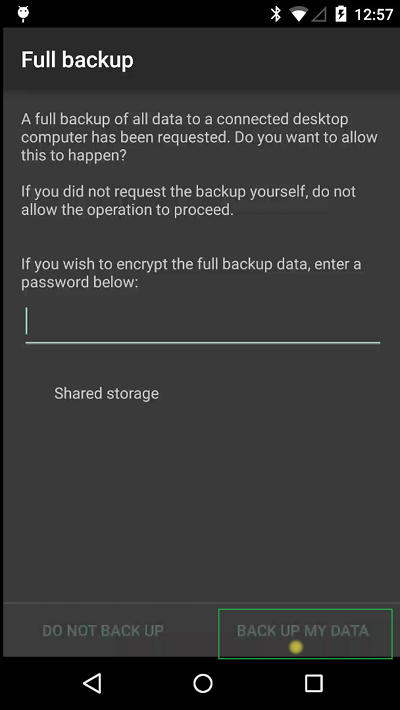
Then you'll get the full backup confirmation prompt, which needs to be answered again with the help of  adb shell input commands.
You can set a password with
adb shell input text password  [2].

However, it does not accept the keyevent 66 to confirm this dialog; this literally inserts a new line at the end of the password.
We have to tap on the "BACK UP MY DATA" button at the right bottom of the screen. Which leads us to

Step 4.
Luckily you can also emulate touch events via USB. Some research, some guessing, and trial and error showed, that this button is roughly in the area of coordinates 800,1750   (so in the right third and just above the button bar). The display is 1080x1920 in size, so that was easy to guess and test.
So we send a
adb shell input tap 800 1750

And the backup starts.
Magic.

Tomorrow I shall hopefully receive my new Nexus 5 (if the UPS guy for once delivers on the first attempt) and then I can report on how the migration to the new device works.

--

[1] The screen is 1080x1920; so the start position for our swipe is 500/1900 , i.e. quite in the middle, almost on the bottom, the end is 500/900, i.e. quite in the middle, quite in the middle, and almost perfect swipe to unlock.
[2] substitute your real desired password for password here, right after text.

Saturday, December 06, 2014

Wakelock Detector for Nexus 5 non-root, Lollipop

Earlier this week I had a good discussion and exchange with Max  - mainly on the Moto 360 watch, but also on a lot of Android / phone topics.

We were sort of mentally debugging a battery/power problem he had on his device (1+1), while my own Nexus 5 was lying around as idle as possible: I had to put it into power saver mode because my own battery was down to 5% at 7pm already.

So after all this discussion about Android power consumption etc etc, I decided not only to do some cleanup on my own device:

  • delete two of the 3 calendar apps, because Lollipop Calender + widget is quite OK now (I removed Cal and Sunrise)
  • change email sync frequency in Boxer from Automatic(Push) to 15 minutes.
but also to install the Wakelock Detector app (WLD), to check if any app is blocking my phone from going to sleep properly.

Since my phone is not rooted (and I have not intention to root it - for the time being), I needed to provide a little help and trick to WLD: essentially through local tpcip connection to the adb on the device. Very well documented here.

So, let's see what I'll find out.


Thursday, December 04, 2014

BeyondPod - per feed playback speed

I have two podcast devices:
  • an iPod Nano, where I have the less time sensitive podcasts, because I only synch it through iTunes every second week or so
  • and BeyondPod on my Android Phone (Nexus 5 with Lollipop as of this writing), where I listen most podcasts, especially the daily ones.
A couple of months ago I changed the playback speed in BeyondPod to x1.3, i.e. 30% faster. I found this the ideal speed to accommodate all the daily (mostly tech) podcasts into my daily commute schedule, while still being at a good pace for listening.

However, some feeds, I like to keep on regular (=x1.0) speed. I guess, the less techie the podcast is, the more narrative it has, the more I like to listen to it at it's original, intended pace. Take the Serial Podcast, for example.

So I always went into the BeyondPod app, and changed the speed - simple.
I was pretty sure, that there is a better way for this, like setting the speed on a feed level. Today I remembered to look for this.
And - of course - BeyondPod can do that.
In the feed settings ("Edit Feed"), when you open the Advanced Settings you'll find it:


Nice one.

However, sometimes you need to be very confident that a certain feature/option "just must be there" in order to find it (especially outside the Apple environment).

Sunday, November 09, 2014

Podcast meets longform - Serial

Ok, not strictly a technical topic. But a couple of weeks ago I stumbled over the Serial podcast.
Serial is a new podcast from the creators of This American Life, hosted by Sarah Koenig. Serial will follow one story - a true story - over the course of a whole season. We'll follow the plot and characters wherever they take us and we won’t know what happens at the end of the story until we get there, not long before you get there with us. Each week we'll bring you the latest chapter, so it's important to listen in order, starting with Episode 1.
I really perfectls combines the podcast format/medium with long form journalism (one whole season!). And the podcast is technically perfect as well.

Hint: it is about an investigation into a Baltimore homicide from 1999. So, if that's not your kind of content, bad luck :)

Sunday, October 12, 2014

New Google Calendar Provider for Thunderbird/Lightning

Finally a Google Calendar Provider for Thunderbird/Lightning has been released that's based on the gdata api, and not just a network XML link.
Problem with the later approach was - to me - that you needed to add each of your calendars separately via their URLs. That seemed to have performance impacts as well. I had about seven such calendars, and it significantly (with my other CalDAV calendars) slowed down Thunderbird start-up time.

When the new provider was released a couple of days ago, I first really noticed, because it forced me - with a separate pop-up - to authorize it for my Google account. With seven calendars this step kept popping up - seven times, of course - but still for the old calendar URLs.
Performance was really nasty...  Thunderbird was unusable essentially.

For some weird reason, I tried a "New Calendar" > "On the Network" > "Google Calendar" and found, that it was actually letting my select Google calendars by account, instead of just letting me add the XML link per calendar like the previous version.

So first thing, delete all my old Google calendars in Lightning, and try the "New Calendar" > "On the Network" > "Google Calendar" again, with my Google account, and voila, it presented all the calendars I had on Google. With the color as on the web. I only needed to select the ones I wanted in Lightning, and that was it.

Should have been like this from the start :)

Thunderbird start-up performance is back to a couple of seconds now (from about 1 minute+)