So I joined Google+ today (thanks, Martin, for the invitation), but more importantly I want to write about Google Takeout today.
Best starting point is the video from the The Data Liberation Front:
The announcement seems a lot more promising than the current implementation itself.
It must have been written exclusively for Google+, becaus that's what Google Takeout focuses on.
There is neither Gmail nor Calendar export... Contacts are exported, though, and conveniently grouped into .vcf files (per contact group... and your circles (see, I told you it was designed for Google+).
Still a good start. Better than Facebook for now. And I like their mindset... that this is MY data, not theirs.
Thursday, June 30, 2011
Saturday, June 25, 2011
Platformness, part two
I recently claimed that a true platform has to protect it's developers from (ridiculous) claims of third parties (indemnification), the same is of course try in the opposite direction:
When an ecosystem around this platform evolves that adds new and important features to this platform, the platform itself should not step in and re-create those add-ons.
Current (counter-) example: Twitter just added their own photo sharing service, thus rendering e Twitpics and Yfrogs obsolete... who were instrumental in Twitter's success during the last years.
In other words: a platform shall not compete with (or against) its developers.
I'd like to call this quality trust.
When an ecosystem around this platform evolves that adds new and important features to this platform, the platform itself should not step in and re-create those add-ons.
Current (counter-) example: Twitter just added their own photo sharing service, thus rendering e Twitpics and Yfrogs obsolete... who were instrumental in Twitter's success during the last years.
In other words: a platform shall not compete with (or against) its developers.
I'd like to call this quality trust.
Labels:
development,
platformness,
twitter
Thursday, June 23, 2011
In The Plex
I just finished this book:In The Plex: How Google Thinks, Works, and Shapes Our Lives by Steven Levy.
Excellent reading, good insights into Google; a bit google-sided but not too much.
I highly recommend this to anyone involved with or interested in Google... (even the opponents and Google haters).
Sunday, June 12, 2011
iCloud
Apple's just announced multimedia cloud storage thingy, iCloud[1] looks like a real threat to Dropbox.Especially if well integrated into the Apple ecosystem (Mac, iOS and applications).
Not for me, though; the 2GB Dropbox offers for free are sufficient for me... but thats only because I do not keep music or photos/videos there..
Also Dropbox will probably always be more cross-platform.
So I'll keep using Dropbox - and invite you to do the same.
--
[1] if they can keep the name :-)
Saturday, June 04, 2011
Platformness
The recent (if not still ongoing) Lodsys v. Apple fight over patent infringement around in-app purchase revealed another important criteria for something to be a platform: indemnification.
Apple (or any platform provider) has to protect developers for their platform from such claims - whether they are justified or - as in this case - just patent trolls.
For a true platform this must never be burdened on the developers.
Hope Google/Android will follow Apple's example.
Apple (or any platform provider) has to protect developers for their platform from such claims - whether they are justified or - as in this case - just patent trolls.
For a true platform this must never be burdened on the developers.
Hope Google/Android will follow Apple's example.
Labels:
android,
apple,
development,
google,
platformness
Monday, May 16, 2011
Mid-May Resolution
Why only have new-years resolutions? Why not start with Mid-May resolutions?
so here's mine:
Tough one... off to buy a new PC in the next 2 weeks (after 8+ years with the one I currently own).
so here's mine:
I'll get a second (CPU) core in my home PC before I get it in my smart phone.
Tough one... off to buy a new PC in the next 2 weeks (after 8+ years with the one I currently own).
Labels:
rant
Wednesday, May 11, 2011
Cloud rants
With the outage of the Amazon S3 storage about two weeks ago and the downtime of the Playstation Network (PSN) due to security problems, the cloud sceptics are on the rise again.
The usual “we told you so” and “the cloud is not safe”... etc etc.
Two thoughts on this
Like at least one IT manager who I heard complaining how expansive 1 TB of storage is in an enterprise grade storage box (or even in a SAN) when they can get 1TB for roughly 50€ as a USB disk...
The usual “we told you so” and “the cloud is not safe”... etc etc.
Two thoughts on this
- Show me one internal IT operation that has an availability or up-time like S3.
- If people would only spend the right amount of money on the cloud services and subscribe to the full package with proper redundancies, etc etc this would probably not happen.
Well, the single outage at one Amazon site will still happen, but not the same net effect on all the other services.
Like at least one IT manager who I heard complaining how expansive 1 TB of storage is in an enterprise grade storage box (or even in a SAN) when they can get 1TB for roughly 50€ as a USB disk...
Sunday, May 08, 2011
Awesome Thunderbird Plugin
So, the other day I sat down to write myself an add-on that was more than overdue for me... or for the way I use mail and Thunderbird.
At that time I called it Domain Specific Move, and it did exactly that. I took the most domain with the most occurrence in an email (scanning to, from, cc) and suggested a folder for this mail; and you were able to train it.
Through Max's comment I learned about the Nostalgy add-on. It actually is about defining keyboard shortcuts and stuff for Thunderbird:
When you really use nested folders like I do - with about 5-6 levels deep, this saves a lot of time.
Same for G as GoTo folder. And there's a nice B (whatever that stands for) that Moves the message to the folder and then goes to the folder (sort of S+G).
Great stuff. Thanks Max, for the hint.
At that time I called it Domain Specific Move, and it did exactly that. I took the most domain with the most occurrence in an email (scanning to, from, cc) and suggested a folder for this mail; and you were able to train it.
Through Max's comment I learned about the Nostalgy add-on. It actually is about defining keyboard shortcuts and stuff for Thunderbird:
Adds keyboard shortcuts to change folder, move/copy messages, with folder name auto-completion (using only the keyboard).The folder name auto-completion is the really awesome stuff. I just have to hit S (for Save == Move) and an entry field pops up at the bottom of the window and I only need to type two or three letters of the folder name and that's it.
When you really use nested folders like I do - with about 5-6 levels deep, this saves a lot of time.
Same for G as GoTo folder. And there's a nice B (whatever that stands for) that Moves the message to the folder and then goes to the folder (sort of S+G).
Great stuff. Thanks Max, for the hint.
Labels:
e-mail,
extension,
mozilla,
thunderbird
Saturday, May 07, 2011
New Google Docs App for Android with OCR
New Google Docs App for Android with OCROk, so here's the image:
Google release a (nativeff) client of Google Docs for Android. Apart way better editing of documents than the (mobile) web version does, it now also supports OCR. (optical character recognition) images directly from the camera. This feature has been in Google docs for a while, but now it is also directly from the phone. Of course I had to try this. It gives you a kind nf James Bond feeling, when you grep you phone with a hidden camera in it[1], bend over a document and take picture of it
With a click it is uploaded to Google and convened to text. With quite impressive results. The image itself is preserved through the upload and attached to the document, so you can manually correct the results.
Naturally, this post had to be created this way.
[1] ofcourse the camera in my HTC Desire Z is not really “hidden”, but part of the 007 experience
And here's the original text:
New Google Docs App for Android with OCR
Google release a (native?) client of Google Docs for Android. Apart from way better editing of documents than the (mobile) web version does, it now also supports OCR (optical character recognition) from images … directly from the camera.
This feature has been in Google docs for a while, but now it is also available directly from the phone.
Of course I had to try this. It gives you a kind of James Bond feeling, when you grep you phone with a hidden camera in it[1], bend over a document and take picture of it.
With a click it is uploaded to Google and converted to text.
With quite impressive results.
The image itself is preserved through the upload and attached to the document, so you can manually correct the results.
Naturally, this post had to be created this way.
---
[1] of course the camera in my HTC Desire Z is not really “hidden”, but it's part of the 007 experience :)
And yes, the typo ("grep" instead of "grab") was by me, not by google.
Labels:
android,
google,
google docs,
ocr
Wednesday, April 27, 2011
Google Calendar Goodie
Have you ever noticed that Google Calender shows the current day (of the month) as the favicon.

Therefore also in the tab (on Firefox), even it the tab is pinned.
Cool. Nice.
Not sure if it is entirely useful, but I like it.
Therefore also in the tab (on Firefox), even it the tab is pinned.
Cool. Nice.
Not sure if it is entirely useful, but I like it.
Labels:
calendar,
favicon,
google apps
Saturday, April 23, 2011
The end of Flock
Flock Official End of Support Notice
Support for Flock browsers will be discontinued as of April 26th, 2011. We would like to thank our loyal users around the world for their support, and we encourage the Flock community to migrate in the coming weeks to one of the recommended web browsers listed below.
Our Recommendations
Since no further security updates will be provided to keep you safe on the web, we encourage all Flock users to upgrade to either Chrome or Firefox. Both are based on the same reliable technologies as Flock, and both are being actively maintained and improved. Also, each of these browsers has a broad selection of add-ons and extensions to customize and extend their capabilities.
For more information (including notes on how to migrate to other browsers), please see our FAQ.
Thanks,
The Flock Team
I de-installed it months ago anyway :(
Saturday, April 16, 2011
Thunderbird hack: Domain Specific Move
One of the most frequent actions in Thunderbird is to move a message that I received from a business partner or customer to a message folder for exactly this partner/customer. Same for messages I sent to them.
However, as you communicate with more customers and partners, the folder hierarchy will become more complex and I already need about 6 clicks to select the specific folder.
Sometimes I'm lucky and it is the most recently used folder, then I can do it with the "move again" function directly in the context menu; sometimes, it is at least in the recent folder menu, still 3 clicks.
WIBNI if TB could just remember that I always move messages from domain A to the folder X, lets say from "ibm.com" to folder "/Vendors/IBM" or something like that, and then present me with a one-click option on the menu.
So I wrote an add-on for this and called it "Domain Specific Move".
It does exactly what I described.
I find the most frequently used domain in the email (counting all from sender, recipient, cc-list).
If I already find a setting for this, I create an additional menu item in the move message menu for a move to this folder.
If not, I present a "learn" menu item, that lets you train the extension on where to put mails for this extension (i.e. register a folder for this domain). You pick the destination folder yourself. No magic included there.
Once I thus learned and stored the folder for this domain, I can - next time this domain appears - present the "Move to " menu item as above.
Configuration is stored in the preferences under "extensions.domainmove.".
Currently I have no options page for this, so if you want to change or remove an entry, you have to go to the prefs.js file or the about: dialog.
Yes, I know, filters can do the same; but when I select to manually run the filter, it will not tell me what exactly it is up to... The beauty of my approach (IMHO) is, that I see it on the menu and can decide otherwise, because not always does the folder registered for this domain really match.
In essence this is only a short cut with an educated suggestion. No behind-the-scenes magic.
Todos:
I will polish the code and implement some of the above todos, then I will post the first beta.
--
[1] well for me as an former Sun and now Oracle employee, all emails contain either an oracle.com or sun.com address and this domain contains no information on where to archive the email.
However, as you communicate with more customers and partners, the folder hierarchy will become more complex and I already need about 6 clicks to select the specific folder.
Sometimes I'm lucky and it is the most recently used folder, then I can do it with the "move again" function directly in the context menu; sometimes, it is at least in the recent folder menu, still 3 clicks.
WIBNI if TB could just remember that I always move messages from domain A to the folder X, lets say from "ibm.com" to folder "/Vendors/IBM" or something like that, and then present me with a one-click option on the menu.
So I wrote an add-on for this and called it "Domain Specific Move".
It does exactly what I described.
I find the most frequently used domain in the email (counting all from sender, recipient, cc-list).
If I already find a setting for this, I create an additional menu item in the move message menu for a move to this folder.
If not, I present a "learn" menu item, that lets you train the extension on where to put mails for this extension (i.e. register a folder for this domain). You pick the destination folder yourself. No magic included there.
Once I thus learned and stored the folder for this domain, I can - next time this domain appears - present the "Move to " menu item as above.
Configuration is stored in the preferences under "extensions.domainmove.
Currently I have no options page for this, so if you want to change or remove an entry, you have to go to the prefs.js file or the about: dialog.
Yes, I know, filters can do the same; but when I select to manually run the filter, it will not tell me what exactly it is up to... The beauty of my approach (IMHO) is, that I see it on the menu and can decide otherwise, because not always does the folder registered for this domain really match.
In essence this is only a short cut with an educated suggestion. No behind-the-scenes magic.
Todos:
- more flexibility with domains with more than 2 parts (e.g. at.ibm.com should map to ibm.com if there is no at.ibm.com)
- unlearn domains (without going to the about: dialog)
- option for domains-to-ignore; currently I ignore non-specific domains as gmail.com, a1.net, gmx.at, sun.com, oracle.com [1].
- ignore "my" domain (see comment re oracle.com)
I will polish the code and implement some of the above todos, then I will post the first beta.
--
[1] well for me as an former Sun and now Oracle employee, all emails contain either an oracle.com or sun.com address and this domain contains no information on where to archive the email.
Saturday, April 02, 2011
On podcasts - Not Print
Not only is a podcast not radio, it is also (not too surprisingly) NOT PRINT.
In a newspaper or journal you usually have the so called standfirst right after/below the headline summing the article to follow. Sort of an abstract, if you will.
This is quite convenient, because it allows you to learn what the article is about (not always that obvious from the headline alone), and maybe skip the article itself entirely.
Sometimes - if I know I am interested in the article - I will skip the standfirst... knowing that there is no additional information in it.
Either way, there are options to avoid the repetition.
Not so in a podcast.
In audio it is less easy to skip things.
If you provide a quick intro to a podcast, be very very brief. Only give the topic. Don't summarize the podcast. Especially not if the podcast is short (5-10 minutes). Do not repeat everything from the podcast in the abstract/standfirst.
Just don't.
It's annoying.
In a newspaper or journal you usually have the so called standfirst right after/below the headline summing the article to follow. Sort of an abstract, if you will.
This is quite convenient, because it allows you to learn what the article is about (not always that obvious from the headline alone), and maybe skip the article itself entirely.
Sometimes - if I know I am interested in the article - I will skip the standfirst... knowing that there is no additional information in it.
Either way, there are options to avoid the repetition.
Not so in a podcast.
In audio it is less easy to skip things.
If you provide a quick intro to a podcast, be very very brief. Only give the topic. Don't summarize the podcast. Especially not if the podcast is short (5-10 minutes). Do not repeat everything from the podcast in the abstract/standfirst.
Just don't.
It's annoying.
Labels:
"on podcasts",
media,
podcast
Thursday, March 24, 2011
WebOS on my Laptop?
I sort of made fun about WebOS on a PC the other day; but after a nice chat with Max, I began to realize that there indeed is a use for WebOS on a PC... on a Laptop to be precise.
On the airport, on the train, on your daily commute, ... this sounds a lot easier than Windows for those situations
Some thoughts and pre-reqs on this:
Come to think of it, I might actually want WebOS on mylaptopThinkPad.
- Imagine a regular Laptop (HP in this case here, if it makes it easier for you :-) )
- Imagine also that by some magic means you'd tell it to boot WebOS instead of Windows/Linux when you power it on or de-hibernate it.
- Imagine that you'd have an excellent browser, video player, good-enough email app, good-enough word/excel/powerpoint viewer and editor, ... all that you have on regular iPads or Android-Tablets today.
On the airport, on the train, on your daily commute, ... this sounds a lot easier than Windows for those situations
Some thoughts and pre-reqs on this:
- You'd need something like a "WebOS key" which you hold to "boot" the WebOS mode.
Windows must not even start to de-hibernate. - WebOS would need to be already running (hibernated to flash, or something like that), not really booted from scratch
- The laptop would need an extra power-saving mode and maybe clock the CPU down in WebOS mode so save battery life
Come to think of it, I might actually want WebOS on my
Labels:
web
Sunday, March 20, 2011
Numeric HTML Input Field and other HTML5 goodies
Some while ago I've written a little web app at home that
a) needs mainly numeric input
and
b) is used mainly from an iPod touch / iPad / other mobile device.
On all of those devices, numeric input is cumbersome, because you first have to switch the virtual keyboard into numeric mode.
Yesterday I googled around again for this, and finally found a solution.

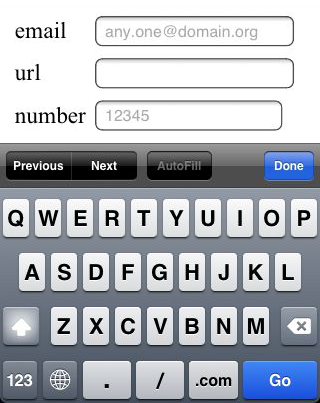
HTML5 has some more types to INPUT fields:
All of them have the effect on the iPhone/iPad that they switch to a virtual keyboard layout that is optimized for the input, e.g.
The email-keyboard on the iPhone will have the @-sign there
The url-keyboard on the iPhone will have the ".com" key; also the . and the / key will be placed more prominently.
The number-keyboard on the iPhone will switch the numbers in the top row.
On my Android 2.2 [1] HTC only the number mode works, but it gives you a numeric block / phone-style keyboard, which is even better for numeric input.
HTML5 defines some more values for the type like "date", "week", "month", "time", ... and "range" for sliders, i.e. for numeric values with clear and narrow boundaries, but those are rarely implemented as of today.
See Dive Into HTML5 for an excellent overview including browser-support.
Since all of the above are defined only starting HTLM5, they are not "supported" on many current browsers, but the good thing is, that all browsers, that do not explicitely support them, revert to type="text" for unknown input-types.
Also there is a new attribute placeholder:
Placeholder text is displayed inside the input field as long as the field is empty and not focused. As soon as you click on (or tab to) the input field, the placeholder text disappears. (from Dive Into HTML)
Sort of like the search box in Firefox.
So back to my initial problem, defaulting to numeric input on mobile devices.
Just replace input type="text" with input type="number", there is no down-side to this.
It is user-friendly on mobile devices, and works like it used to on all other browsers.
a) needs mainly numeric input
and
b) is used mainly from an iPod touch / iPad / other mobile device.
On all of those devices, numeric input is cumbersome, because you first have to switch the virtual keyboard into numeric mode.
Yesterday I googled around again for this, and finally found a solution.

HTML5 has some more types to INPUT fields:
| type="email" | for email addresses |
| type="url" | for web addresses / URLs |
| type="number" | for numeric input |
All of them have the effect on the iPhone/iPad that they switch to a virtual keyboard layout that is optimized for the input, e.g.
The email-keyboard on the iPhone will have the @-sign there
The url-keyboard on the iPhone will have the ".com" key; also the . and the / key will be placed more prominently.
The number-keyboard on the iPhone will switch the numbers in the top row.
On my Android 2.2 [1] HTC only the number mode works, but it gives you a numeric block / phone-style keyboard, which is even better for numeric input.
HTML5 defines some more values for the type like "date", "week", "month", "time", ... and "range" for sliders, i.e. for numeric values with clear and narrow boundaries, but those are rarely implemented as of today.
See Dive Into HTML5 for an excellent overview including browser-support.
Since all of the above are defined only starting HTLM5, they are not "supported" on many current browsers, but the good thing is, that all browsers, that do not explicitely support them, revert to type="text" for unknown input-types.
Also there is a new attribute placeholder:
Placeholder text is displayed inside the input field as long as the field is empty and not focused. As soon as you click on (or tab to) the input field, the placeholder text disappears. (from Dive Into HTML)
Sort of like the search box in Firefox.
So back to my initial problem, defaulting to numeric input on mobile devices.
Just replace input type="text" with input type="number", there is no down-side to this.
It is user-friendly on mobile devices, and works like it used to on all other browsers.
--
[1] I'll check 2.3 and 3.0 once my PC is fast enough for the SDK.
Saturday, March 19, 2011
Android SDK and a new PC ?
So now that I finally moved to Android, I installed the Android SDK on my home computer plus the NetBeans plugin.
I seems to work fine, I can get the Hello World sample to compile and package and it shows up in the emulator.
The problem is that my 8 years old (!) PC with only 1.something GHz and 1GB RAM is definitely too slow and weak for this. Booting Android (2.2) in the Emulator takes longer than actually buying, charging and starting a physical Android device ...
So I guess I need a new PC now as well..
OK, I wanted to get a new one anyway, come April, so that my current PC can actually celebrate it's 8th birthday...
So proud...
I seems to work fine, I can get the Hello World sample to compile and package and it shows up in the emulator.
The problem is that my 8 years old (!) PC with only 1.something GHz and 1GB RAM is definitely too slow and weak for this. Booting Android (2.2) in the Emulator takes longer than actually buying, charging and starting a physical Android device ...
So I guess I need a new PC now as well..
OK, I wanted to get a new one anyway, come April, so that my current PC can actually celebrate it's 8th birthday...
So proud...
Labels:
android,
development
Friday, March 18, 2011
So long...
So long, Nokia, and thanks for all the fish handsets.
Had a great time and fun with Nokia handsets for the last 14 years or so ... But now I'm leaving.
I'm now proud owner of my own HTC Desire Z (not only the test equipment, thanks again Richie).
Had a great time and fun with Nokia handsets for the last 14 years or so ... But now I'm leaving.
I'm now proud owner of my own HTC Desire Z (not only the test equipment, thanks again Richie).
Monday, March 14, 2011
WebOS on my PC?
With HP To Include WebOS on Every PC Shipped From 2012 Onward
and that the WebOS Emulator is built on Virtualbox, I assume that I could soon have a copy of WebOS running on my PC?
Labels:
virtualbox,
webos
Sunday, March 13, 2011
Book: iWoz - by and about Steve Wozniak
A couple of weeks ago I read iWoz: How I invented the Personal Computer and had fun doing it by and about Steve Wozniak.Only I forgot to blog about it then. So here you go.
Fascinating book... well, when I say that, it will not win the Nobel prize, but it is so full of memories.
That is,
- if you ever did something in hardware;
- if you ever (like I did at TechU Vienna) designed some chips (integrated circuits - not crisps or fries)[1]
- if you ever designed a small computer system, with CPU, memory, and all the device controllers
- if you ever had to write BIOS functionality or at the operating system level
- if you ever wanted to do more with some gadget than the manufacturer intended you to do
- if you ever spent[2] days optimizing some machine instructions / assembler programs to use 2 cycles less
An experience quite close to time travel
--
[1] by the way my first contact with SunOs
[2] read: wasted
Saturday, March 12, 2011
And Nokia?
Nice observation (by my wife, actually), that - until half a year ago - we used to be a pure Nokia family... for years.
Me, her, the twins... only Nokia.
If there is such a thing as a Nokia fan boy - I probably was one.
Now we are pure Android family (2x HTC, 1x Samsung, 1x Sony Ericsson; see here and here).
IMHO, this says a lot about Nokia.
Me, her, the twins... only Nokia.
If there is such a thing as a Nokia fan boy - I probably was one.
Now we are pure Android family (2x HTC, 1x Samsung, 1x Sony Ericsson; see here and here).
IMHO, this says a lot about Nokia.
Subscribe to:
Posts (Atom)