I just noticed that there is a short-cut to kinda toggle between HTML and plain-text in Thunderbird when composing a message.
You just have to hold the shift-key when you "launch" the compose/editor window, and it will use the opposite mode of your profile.
So, when you have HTML on per default, and want to compose a new mail in plain-text you just hold the shift-key while you hit the "Create a new message" button.
Or when you hit Reply, ...
Nice.
Does not work inside the composer window though.
Since I have not found a toggle button (extension) for it so far, and always going through Options->Format->Plain Text Only is a bit cumbersome, I'll write one ...
Someday. But for the time being, the shift-key helps.
Friday, September 26, 2008
Monday, September 22, 2008
Dopplr's obsession with planes
Dopplr - the great and cool travel social network - has an obsession with traveling by plane, that I cannot share.
Since they started recording the means of transportation for a trip (by car, by train, by plane, ... on foot) to calculate your carbon footprint, the default setting is "by plane" no matter what the trip.
Even for a trip that is only 200km... or less.
I checked if I could overwrite this in my traveler profile, but I cannot (or at least I did not find the setting for it)
When you tweet or email a trip, dopplr does not even parse a string like "by car" - which would be easy to parse, given the clear and narrow dictionary "by plan", "by train", "by car", "by bus", ..., "on foot". One could really look for those strings literally.
Since they started recording the means of transportation for a trip (by car, by train, by plane, ... on foot) to calculate your carbon footprint, the default setting is "by plane" no matter what the trip.

Even for a trip that is only 200km... or less.
I checked if I could overwrite this in my traveler profile, but I cannot (or at least I did not find the setting for it)
When you tweet or email a trip, dopplr does not even parse a string like "by car" - which would be easy to parse, given the clear and narrow dictionary "by plan", "by train", "by car", "by bus", ..., "on foot". One could really look for those strings literally.


Sunday, September 14, 2008
Some Flickr Observations
Just some random thoughts and observations around flickr.
Good night.
[1] I know that the HTTP header is called "referer", but don't blame me, if the standards guys don't know proper English.
[2] Does not really rhyme well, but what the heck.
- I don't get explore – or the interestingness.
I do have (or did have) a couple of my pictures in explore in the past, but – quite frankly – I only see the explore-worthiness of 2 of the 5 - guess which.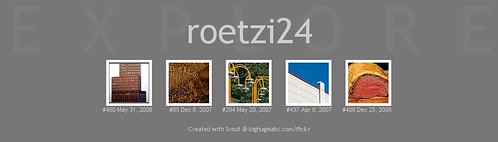
I don't really want to understand the algorithm, really, I just don't get it. That's all. - Why for example are my 2 personal favorites (of my own pictures) not in explore ?
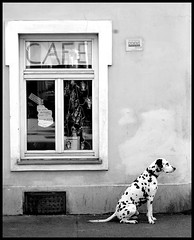

That's what I really don't understand. - Why did flickr change their start page?
I now cannot distinguish that easily between activities on my pictures (comments, favs) from activities by me on other pictures. That used to be separate, and I quite liked it. - News drive(s) flickr views... [2]
I do have a couple of pictures of my next door (or rather vis-a-vis) building, the "Stadt des Kindes" (read: City of/for children) - an abandoned former children's home and/or orphanage in Vienna. Used to be quite progressive 30 years ago - both, from a pedagogical and architectural point of view. Now the building is about do be demolished and the demonstrations against that of course made it into the local news... All of a sudden the stats on my Stadt-des-Kindes picture went significantly up, which google-image search being the #1 referrer[1].
Strange ... but feels good.
Good night.
[1] I know that the HTTP header is called "referer", but don't blame me, if the standards guys don't know proper English.
[2] Does not really rhyme well, but what the heck.
Thursday, September 11, 2008
New flickr home page
Flickr has upgraded (or is just about to upgrade) their homepage with more dynamic and community oriented features. More details here on the flickr blog
Sunday, August 31, 2008
GUI broken ?
Isn't a GUI utterly broken, when the status bar (of the main window (!)) says "Opening Main Window..." for half a minute ?
Sunday, August 10, 2008
Windows file type registration for OOo 3.0 Beta for Windows
Just installed the latest OpenOffice.org 3.0 build over the previous one, and all the Windows Explorer integration was lost.
I googled around a bit, and found this on GullFOSS:
I reinstalled with setup.exe WRITE_REGISTRY=1 as stated above and it worked like a charme.
I googled around a bit, and found this on GullFOSS:
"If you test the OpenOffice.org 3.0 Beta on the Windows platform, you might be wondered about the missing system integration. Well, we decided to avoid the system integration in the Windows registry, because it conflicts with an existing system integration of an OOo 2.x, that you are probably using for your daily work. But if you know, what you do, you can of course get the complete system integration for your Beta tests. You only have to set the global property WRITE_REGISTRY, that is used as condition in the Windows Installer database. So please use
setup.exe WRITE_REGISTRY=1
or if you prefer the direct call with Windows Installer service:
msiexec.exe /i WRITE_REGISTRY=1"
I reinstalled with setup.exe WRITE_REGISTRY=1 as stated above and it worked like a charme.
Saturday, August 09, 2008
Thursday, August 07, 2008
Firefox 3 - finally
I finally moved to Firefox 3.
Because one of my favorite extension (add-on) was not FF3 compatible, I was still using FF2 only.
ConQuery was (is) the culprit. It is only 2.0.0.* compatible, and even if you "patch" the max version to 3.0.* it of course does install and run, but cannot parse the opensearch plugins from mycroft. So it was unusable.
Interestingly is was working with those search plugins nicely under FF2 ... odd.
I had FF3 only running in my virtualbox, but not on my "main" desktop. And once you get used to the speed of FF3 you will get annoyed when you have to repeatedly go back to FF2.
Only yesterday, I found out that I was kind of using the wrong extension in the first place, since there is a Context Search add-on for FF as well, which runs perfectly with opensearch, FF2 and FF3.
So there was no more obstacle...and I'm on FF3 now.
So much faster.
And the awesome bar is really awesome... or at least better than the old one.
Because one of my favorite extension (add-on) was not FF3 compatible, I was still using FF2 only.
ConQuery was (is) the culprit. It is only 2.0.0.* compatible, and even if you "patch" the max version to 3.0.* it of course does install and run, but cannot parse the opensearch plugins from mycroft. So it was unusable.
Interestingly is was working with those search plugins nicely under FF2 ... odd.
I had FF3 only running in my virtualbox, but not on my "main" desktop. And once you get used to the speed of FF3 you will get annoyed when you have to repeatedly go back to FF2.
Only yesterday, I found out that I was kind of using the wrong extension in the first place, since there is a Context Search add-on for FF as well, which runs perfectly with opensearch, FF2 and FF3.
So there was no more obstacle...and I'm on FF3 now.
So much faster.
And the awesome bar is really awesome... or at least better than the old one.
Wednesday, August 06, 2008

Monday, August 04, 2008
Dopplr and Twitter problem fixed
A couple of weeks ago, Dopplr (the social travel network) announced support for twitter (and email and sms). That is, you can send a tweet to the dopplr user on twitter with your travel details, and it will automatically get added to your Dopplr account as a new trip.
Of course you first have to register your twitter user with your Dopplr account... (why this is, and why the number of identity silos as ever increasing is a different story, and I'm sure I will rant about identity in social networks soon here).
You do so, by sending a (private/direct) message to the Dopplr account with a secret key (kind of thing) that you get from Dopplr. Once you sent this, the link between your Dopplr account and your twitter name is established, i.e. messages from this very twitter name will be associated with your Dopplr account.
From then on, you send messages like
“I'm going to munich from Sep 23rd to Sep 29th“
to Dopplr and the trip will be added automatically. Confirmation is sent both via twitter and via email.
In my case, however, the registration failed.
Dopplr just would not react to my registration message. Simply ignored it. I first thought, that I did something wrong, but today I got an email from Matt Biddulph , the CTO of Dopplr:
Subject: Apologies for a recent problem in Dopplr's Twitter support
This morning we discovered a bug that has affected about 60 Dopplr accounts, including yours. It meant that when you sent us a message to associate your account with your Twitter account so that you could send us trips, it didn't work correctly.
We've just fixed the bug and deployed new code to our servers. If you'd like to try again starting at http://www.dopplr.com/account/twitter then the process should now work.
I'm sorry for this problem, and hope you enjoy using our new Twitter feature.
Matt Biddulph,
Dopplr CTO.
I tried the registration again, this time it worked.
Dopplr replied with
Thanks, now we know who you are on Twitter. Full usage instructions are at http://dopplr.com/account/twitter
within a minute or so, and then I was able to add my sample trip to Munich (this is just an example, don't expect me in Munich at that time).
Which is then confirmed by an email:
Subject: Re: Your twitter message to Dopplr
Thanks for sending us a message by twitter.
We automatically created a trip to Munich, Germany (from Vienna,
Austria) between September 23rd and September 29th
We won't share coincidences from this newly-created trip with your
fellow travellers until August 13th. This is to give you a chance
to check and correct any problems in interpretation.
If you'd like to check, go to
personal link deleted
Yours sincerely,
The Dopplr Team.
I love the idea to put the new trip into a kind of quarantine for 10 days, but still publish it then by default.
So it works great now.
I was so surprised by Matt's email, that (I guess for the first time ever) I replied to him thanking him for the service.
Unusual... even for cool startups.
Saturday, August 02, 2008
Update on gmail mobile vs https
As reported earlier, I had problems with both the new "Always use https" option on and still use gmail from my mobile.
So, first of all, I installed v1.5 of gmail mobile for my 6233. This did not go through the JavaME update process, because it seems Google changed the download URL for it. Just point your (built in) mobile browser to http://gmail.com/app and you can download from there.
According to the gmail blog and help center there should be a way to have "Always use https" on and still use the mobile app.
I tried this, i.e. activated both, the "Alway use secure network ..." on the mobile and the "Always use https" on the web (and turned "Always keep me signed in" back on again after a while.
Now I always get signed out of the mobile application whenever it tried to connect to gmail with a
error message.
So, still does not work.
Had to turn "Always use https" back off again...
So, first of all, I installed v1.5 of gmail mobile for my 6233. This did not go through the JavaME update process, because it seems Google changed the download URL for it. Just point your (built in) mobile browser to http://gmail.com/app and you can download from there.
According to the gmail blog and help center there should be a way to have "Always use https" on and still use the mobile app.
If you have the latest version of the app (1.5), you can work around these errors by also enabling the app's own 'Always use secure network connections (slower performance):' setting from your device and then signing out:
- Select Menu > Go to > Settings.
- Check the Always use secure network connections (slower performance): option.
- Make sure the 'Always keep me signed in' option is NOT checked (in order for you to sign out).
- Save your changes.
- Select Menu > Exit Gmail.
- Restart the app and sign in.
(from help center)
I tried this, i.e. activated both, the "Alway use secure network ..." on the mobile and the "Always use https" on the web (and turned "Always keep me signed in" back on again after a while.
Now I always get signed out of the mobile application whenever it tried to connect to gmail with a
Username and password do not match. You provided (...)
error message.
So, still does not work.
Had to turn "Always use https" back off again...
Thursday, July 31, 2008
Gmail mobile fails when "always use https" is turned on
So, of course, when Google released the "Always use https" feature in gmail I (paranoid as I am) turned it on.
At a seemingly unrelated time later my mobile Gmail on my Nokia 6233 failed to connect with the (misleading) error message
I did not get the correlation to the https setting, but a couple of days later (yesterday) it struck me... and it turned it off again ... voila, gmail mobile wors again.
(and turned it on again -> fail ,turned it of -> works).
Turns out, that this is well documented:
Bad thing is, my 6233 is running with gmail v1.1.1 and there does not seem to be an update for it...
At a seemingly unrelated time later my mobile Gmail on my Nokia 6233 failed to connect with the (misleading) error message
"This program requires a working data connection... Please check you signal stength."- whilst the GPRS/data indicator is active and all other apps work.
I did not get the correlation to the https setting, but a couple of days later (yesterday) it struck me... and it turned it off again ... voila, gmail mobile wors again.
(and turned it on again -> fail ,turned it of -> works).
Turns out, that this is well documented:
Some products that connect to Gmail, like Google Toolbar, are not yet compatible with https. We're working to identify issues like this and get them fixed, so visit your product's Help Center if you encounter problems after enabling this setting. In particular, check out this Gmail Help Center page if you use the Gmail mobile app, as you may initially hit an error when you try to use it (we're working on a fix).
(from the gmail blog)
Bad thing is, my 6233 is running with gmail v1.1.1 and there does not seem to be an update for it...
Tuesday, July 29, 2008
Fighting with XUL in Thunderbird
For some strange reason that I have not figured out yet I totally fail to reference the „Move“ menu in the Thunderbird Message menu... odd.
Have to dig deeper into this.
Have to dig deeper into this.
Sunday, July 27, 2008
Finally a Thunderbird bug fixed
One of the TB "bugs" that bugged (no pun intended) me most was that a couple of controls (menuitems etc. ) did not have an ID associated with them , and so were not really (or not really easy) for extensions do overlay.
But since 2.0.0.16 (hot of the press) this should be fixed:
Bug 411481 – Make it easier for extensions to overlay the TB menubar by adding IDs
Let's see how complete....
But since 2.0.0.16 (hot of the press) this should be fixed:
Bug 411481 – Make it easier for extensions to overlay the TB menubar by adding IDs
Let's see how complete....
Vacation vs email
 After a 2 week vacation (a "near offline experience") I managed to reduce my business email inbox from 450 unread items to 17... Those 17 I really have to act upon.
(And I'm not talking to email I receive from a maillist, or other inboxes like Flickr, Friendfeed, Google Reader, ...)
Which means that in 2 weeks time I have <4% meaningful emails ?
Ok, I've read about 80% of the emails - at least the subject and the first couple of lines - on my Palm through my bluetooth/6233/gprs connection. But that was trouble enough.
a) VersaMail on the Palm T|X does not successfully delete emails on the (IMAP)Server, not matter how often you tell it to...
b) Neither das the Nokia 6233 built-in email client; though it says it does IMAP and it from a pure protocol level does it of course, it simply only offers POP functionality, though; i.e. retrieve, mark-read on the server (always on retrieval, how annoying) , but no delete.
c) more and more emails tend to be HTML, so neither the Palm nor the Nokia is a good interface to read them - unless you can get actual information out of a "Your email-reader does not support HTML...."
Time to get an iPhone or Blackberry ???
Or are the above stats (<4%!) telling me, I should not even bother with mobile email anymore (after I successfully have worked with it (and implemented it earlier myself) since 1999...
My god, that was last century ...
Friday, July 11, 2008
Offline... how strange
As followers of my Dopplr profile already know, I'll be offline for 2 weeks, and I guess totally offline.
I'm not really use to that anymore, hasn't happend in the last 3 or 4 years...
Lets see how I can cope with it.
I'm not really use to that anymore, hasn't happend in the last 3 or 4 years...
Lets see how I can cope with it.
Tuesday, July 01, 2008
Now all presentations from JavaDeus08 available for download
Well, the <title> kind of say it all... here's the link.
OpenOffice.org 3
I've been playing around with the latest OpenOffice.org 3 builds for a couple of weeks now...
One of the nicest changes in the Writer is the zoom functionality, which (quite frankly) s^h^h ^h was not that good in previous releases.
Now it looks like this:

You can actually zoom by dragging the slider... as expected.
A lot better than in the old dialog:

So lets forget about that.
btw: you can safely run OOo 3 (developer builds) alongside an older version (e.g. StarOffice 8 in my case).
One of the nicest changes in the Writer is the zoom functionality, which (quite frankly) s^h^h ^h was not that good in previous releases.
Now it looks like this:

You can actually zoom by dragging the slider... as expected.
A lot better than in the old dialog:

So lets forget about that.
btw: you can safely run OOo 3 (developer builds) alongside an older version (e.g. StarOffice 8 in my case).
Sunday, June 29, 2008
Wordle - Beautiful Word Clouds:
Wordle is a cool online tool to create really beautiful word clouds out of a given ... eh .. dictionary, if you will, or list of words, actually. The more frequent a word is (in this list) the larger it will be represented of course.
Here is my tag cloud for this blog (as of just before this post):

Wordle can also go directory to a del.icio.us accunt and pick the tags as input from there.
So here's my del.icio.us tag cloud:

You can change the orientation, font, colorings, ...
Quite nice, I thought.
Here is my tag cloud for this blog (as of just before this post):

Wordle can also go directory to a del.icio.us accunt and pick the tags as input from there.
So here's my del.icio.us tag cloud:

You can change the orientation, font, colorings, ...
Quite nice, I thought.
Friday, June 27, 2008
Presentations from JavaDeus 08
The first set of presentations from JavaDeus08 are ready for download. Just follow the download link from the event homepage.
Subscribe to:
Posts (Atom)
 Subscribe