Sunday, October 20, 2013

Screenshots with Dropbox

A couple of weeks ago, Dropbox (my favourite cloud storage or rather information sharing tool) started to support putting Screenshots directly to your Dropbox folder (for Windows and Mac).
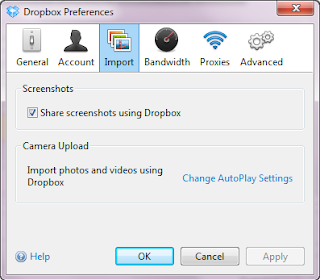
Make sure you have Verison 2.4 (or later) installed (get it here), then open preferences and enable Share screenshots using Dropbox on the Import pane.

From then on, when you press the Print Screen button, Dropbox will save the screenshot to a (new) folder in your Dropbox named Screenshots.

Alternativeley when you hit Ctrl Print Screen it will save the screenshot and copy a public web link (URL) pointing to the screenshot to your clipboard. You can immediately paste this into the browser, or an email, or skype, or whatever you want to use to share this screenshot with friends or coworkers.

You will then see a notification on your Dropbox taskbar icon, once the screenshot is saved (and ready for sharing).

By the way,  those screenshots where taken with Dropbox (as descripbed above) and then edited with Gimp.

Wednesday, September 25, 2013

Remember S.E.T.?

The other day, while cleaning out some drawers at home, I found an old registration confirmation for S.E.T from VISA.
I must admit, I hardly remembered.
S.E.T. - short for Secure Electronic Transaction(s) - was an attempt by VISA (and others) to establish secure protocols for electronic payments.
I think we even implemented this in an online shop, around 2000. At least we had a plan to do so, not sure if we really did...

Anyway, if you want to get nostalgic, check it on Wikipedia.

And while you're at it, check out WAP as well, should go to the same drawer shredder.

Tuesday, September 10, 2013

Dryft Virtual Keyboard

Wow... if this virtual keyboard - just presented by dryft - really works, I need it...

Don't have an Android tablet yet, but I neeeeed this.

(via GigaOm)

Sunday, September 08, 2013

Friday, September 06, 2013

JSP/JSTL migration problem

While migrating some of my work stuff from my old WinXP laptop (ThinkPad T500... good old machine) to my new Windows 7 T430 (also fine iron), I switched from Tomcat v5 (yes, indeed, old) to Tomcat v7.
Tomcat v7 comes with a new servlet, JSP and EL spec. Not a real problem - I thought.

But once I got all the data sources etc up and running, my JSPs would not compile and gave EL parsing errors like "javax.el.ELException: Failed to parse the expression".

A bit googling revealed this nice post on Stackoverflow.

Turns out, that with the new EL standard, Java keywords are forbidden as variables.

And I had "static" as an URL parameter  in ${empty param.static} as well as "class" as a variable to hold css/style class-names.

Once I renamed those everything worked fine again.
The first once was nasty, though, because as an URL parameter the name was of course exposed externally... Had to change some other scripts as well.

Thursday, September 05, 2013

No Key Lime Pie, take a break ^h^h^h^h^h^h Kitkat instead

So, Google decided to call the next Version of Android (4.4) Kitkat instead of Key Lime Pie (as has been rumoured).

Not a bad name, probably more (brand) recognition world-wide then key-lime-pie.
Also, they created a wonderful Apple spoofing ad. I just love it.


So I probably have to turn to my dear daughter to make me one of those... Keylimepiecut

Wednesday, August 14, 2013

JK everywhere

No, I'm not talking about the author of Harry Potter...  and I'm actually offended that you even considered this.

I'm talking about the keyboard shortcuts "J" and "K" (amongst others) to scroll/jump up and down in lists.
Using J and K to scroll goes back to the vi editor when you used it on old terminals without cursor keys (or maybe probably earlier, but I know them from vi) ... get the history here.

J/K became really popular with Google Reader (RIP), then later Google+ adopted it, Facebook followed as well, then of course feedly as the Google Reader replacement did it, and now I noticed that flickr (with their infamous redesign) at least adopted J/K navigation.

In case you are not familiar with it... J steps/scrolls down to the next post, K goes one step backward to the previous post.
That simple.

Thursday, August 01, 2013

Skydrive?

So, Microsoft will have to rename Skydrive...
BBC News - Microsoft made to rename Skydrive after BSkyB victory:

Makes me chuckle, and to some extent mad... No one would confuse Sky (the TV network) and Skydrive. Really.

If this were IBM, this could never have happened; they'd have clled it  'DDSF' from the start - as in 'Dislocated Data Storage Facility' :)

Friday, July 26, 2013

Android 4.3 refined app permissions

The key elements of discussions on app security on iOS vs Android (e.g on Tech News Today, All About Android, ... and others) have always been like this:
  • on iOS you as a user doesn't know anything (because he doesn't have to... Apple cares, so you don't have to)
  • on Android you know the permissions of the app and accept them (during installation), but still can't do anything about it (except for not installing, or rooting in some cases)
I always wondered, why the app manager or security manager did not let you change those permissions after installation as well?

It works like this: in order to do something privileged like placing a call, reading contacts, accessing the internet, ... anything outside the "sandbox" of the app, the app has to declare this in the manifest that comes with the app. If it is not declared, it is not granted, and the activity (e.g. reading contacts) will fail.

Now, with Android 4.3 it seems there is a tool to change those permissions during the life cycle for the app - see screenshot.
See also here on Android Police or here on TechCrunch.

This is really great: you can no e.g. enable location access / GPS for the one or two times you really want an app to have it, but revoke it afterwards...

One caveat, though: I'm afraid that most app developers are lazy and rely on the old model. That assume that the app will have the permission(s) simply because it asked for it during installation, so they will on catch the fact/error that the permission has been revoked, and simply crash.

Expect one or two iterations of some apps to fix this....

Still a huge improvement.

Sunday, July 14, 2013

HTC confirms One S will no longer receive Android updates

Crap, crap, crap. After only one year.
This has been out for about 2 weeks already, but - optimist as I am - I wanted to wait for HTC to backpedal on this.

They didn't... so there.
HTC confirms One S will no longer receive Android updates:

"We can confirm that the HTC One S will not receive further Android OS updates and will remain on the current version of Android and HTC Sense. We realize this news will be met with disappointment by some, but our customers should feel confident that we have designed the HTC One S to be optimized with our amazing camera and audio experiences."

Yeah, "confidence" is what I feel... right...

Saturday, July 13, 2013

A weird one: RTM on my HTC

Earlier this week I noticed that the battery on my HTC One S drained really fast.
I check some settings and stats and found that the Remember the Milk app (RTM) seems to be the culprit.
  1. GPS was on all the time (seen in power > history)
    even though I explicitly turned it off... it stayed on
  2. the RTM app used more than one third of the power
    (and location alerts were disabled... so there should not have been any link to the GPS thingy above)
  3. however, RTM was using GPS all the time, as can be seen in the details.
That was weird.

And I could not make this go away.
I was pretty sure that during the previous days, I rebooted the phone (just because for lack of power...)
So I posted a question to the RTM support forum and disabled the app for the time being.

You have to re-read the last half sentence to fully understand how this was bothering me:
I - totally dependent on RTM - disabled the app on my phone. Imagine that.

The RTM folks responded, I described the problem in more detail, and got the tip/request to 
  1. uninstall RTM app (not simply disable)
  2. reboot the phone
  3. re-install RTM app from the play store.
I did as requested, and voilà the problem was gone.
RTM does not even show up any longer in the power statistic. (So nowhere near 34%).
And GPS is really only on when I need it (see history).


Should have thought of this myself: I mean, I'm in the business too long not to consider re-boot and re-install :)

Big thanks to the RTM team for their fast help

Saturday, June 29, 2013

Beyond Google Reader - Backup

So, when I will be back from vacation next week there wont be any Google Reader left.
Time to declare myself a coward and take a backup of my OPML and put it to Dropbox.
Just to be sure.


You might consider that, too.

Friday, June 21, 2013

Beyond Google Reader - Part 5

Maybe the final part... but then again, maybe not.

Yesterday my Feedly account got migrated from Google Reader Backend to the Feedly backend - the Feedly Cloud.

Can be verified at the URL http://www.feedly.com/home#console.


You'll either see Google Reader or feedly cloud as the back end service (in the nice json output you get there).

So on all of my devices (PC, laptop, Android mobile, iPad) I'm on feedly now. Google Reader bookmark and app... unpinned and gone.
Fingers crossed.

I hope that Reedr - still my favorite on the iPad - will use the feedly cloud soon.

Saturday, June 08, 2013

Recommendations: music vs apps

I think it was on a recent episode of This Week in Google where someone was expressing their hope that now that Google seems to have good recommendation engine in their Google Music service, that this would extend to the Apps market/store as well.

I beg to differ: recommendation for music (or books, or "arts" in general) is rather easy [1], because you (the consumer, the audience) is very likely interested in stuff similar to what they already head/read/like/love.

On the apps side, this does not make any sense; you don't need an app that has a similar user interface to ones you already have/use, you don't need a second or third todo app, or calendar app.

You might collect jazz or Beethoven or Sci-Fi books, but you don't collect todo apps.

--
[1] not that I knew how to program it, but easy as a concept

Friday, June 07, 2013

Beyond Google Reader - Part 4

So, feedly finally announced that they are building the back-end service for the Google Reader replacement and - more importantly - are working with 3rd party app developers such as Reeder to support them... *before* the sun will set on Google Reader.

Building Feedly | Re-imagine how people keep in touch with their favorite sites.
"We have been working behind the curtains with the developers of Reeder,Press, Nextgen Reader, Newsify and gReader as design partners for our Normandy project[1]. Today we are excited to announce that you will be able to access your feedly from all these apps before Google Reader retires and that the access to feedly API will be free. More details soon."

Monday, May 27, 2013

CalConnect: 7 Things You Should Know About Tasks

One of those conundrums [1]: The more popular mobile devices get, the more people care about data interchange. Don't ask me, why they did care less on PCs... Probably it is easier on a PC to read and re-type a calendar event, than on a smartphone.

So, I'm glad to read that the CalConnect consortium is doubling their efforts on Task (todo) exchange/interchange/compatibility.


--
or is it conundra ?

Sunday, May 26, 2013

Beyond Google Reader - Part 3

So, only 5 more weeks or so to go before we geeks have to eke out our miserable existence without Google Reader.
As I mentioned in one of my previous posts, I will most probably switch to Feedly.

Here's where I stand today:
  • I mostly gave up the Google Reader app on my Android mobile, 99.9% on Feedly.
  • On my iPad I do 80% on Reeder, 20% on Feedly... and Feedly's share is increasing.
    Reeder's future is not entirely clear, except they say they plan to continue.
  • On the PC I'm also 80% still in Google Reader, 20% in Feedly.
Basically I'm waiting for Feedly to launch their own back-end service, then import (hopefully auto-magically) my Google Reader feeds in there and just continue.

Ah, and in the meantime Digg seems to be progressing with their Reader back-end. Let's hope they'll launch it openly for any reader app out there.

Thursday, May 09, 2013

Syncing Google Contacts to iPad/iPhone Address Book via CardDAV

The cloudier software and services get, the less I sync my iPad with iTunes.
It took Apple a while, but even podcasts can now be sync'd over the air without iTunes.

The only thing that I really needed to go through iTunes was syncing my iPad address book with Google Contacts (in GMail). I only synced about once a month (probably even less often) so my address book really missed some contacts.

But now that we have 2013 Apple and Google both support CardDAV - if you will, the address book equivalent of the more popular CalDAV (for calendar data).

With CardDAV the iPad (or iPhone for that matter) directly goes to Google without the detour through iTunes on the PC. The benefit: you'll be really in sync, like on Android. (SCNR)

Here's what you need to do:

Create a new Account with CardDAV

In Settings find the Mail, Concacts, Calender bullet; the first section is the Accounts section, and there click on Add Account.... Create a new Other account and then select Add CardDAV Accont in the Contacts section.


All you need to provide then is google.com for the server, and your Google credentials (userid and password). You can of course modify the description, but the default - taken from the server name - google.com sounds quite apt, doesn't it.

That's it.
Really.


Unless...

... you did sync your Google contacts previously through iTunes - like I did.

Because then you will notice - in the contacts app - that now all entries are duplicate. Once from the new CardDAV account, and once from the iTunes sync.

Let me show you the fastest way to
Delete the old Address Book

Back to the Settings / Mail, ... page.
Create a new Microsoft Exchange account with dummy parameters like test for Email, Username and Password. I used "test" for it.

Then the iPad will prompt you for a server name, say m.google.com, just to have one that really exists and answers.

Next the iPad will ask you for the services on this account, make sure you turn Contacts to ON.
And now the nice part: you will be prompted if you want to delete all your local contacts. Say you do. And confirm. Be sure to save the account settings, because it will only delete when you save.

And now the old local address book will be gone.
Remove the dummy Exchange account you just created.

Now you have all your Google contacts sync'd to the iPad through CardDav... over the air. No iTunes needed.
Don't forget to go to the PC and turn of Contacts sync (to Google) for the iPad as well.

Saturday, May 04, 2013

How not to share on Android

This morning my wife told me that one of our favorite restaurant guides for Vienna (Wien, wie es isst) now has an Android app. I knew this app from the iOS version (earlier on my iPod touch) and I had not been impressed by it - largely because of the required paid subscription and lack of features.

Well, half an hour later she found a review of a new restaurant in Vienna, which we decided to try soon, and she wanted to make a note of this (address, phone, ...) in Evernote.
When I saw her typing like there was no tomorrow, I asked here, why she did not simply share this restaurant from the guide app to Evernote.

Well, turns out, you can't.  Because those (strong language deleted here) developers decided not to properly implement the share functionality (with the Android SEND intent), but implement their own.

And guess what happens then: you only implement a view of the share functions / targets... and this is not what Android is supposed to be.

Of course, we can only find Facebook, Twitter and E-mail there, because the developer had no clue that I had e.g. Remember-The-Milk on my smartphone; or Evernote, or Google Keep for that matter, or any other app that might want to receive this information.

Simply freaking share with the SEND intent, please! It is easier, less effort (for the developer) and will actually fit the user's needs and expectations. That's why it is there.

Wednesday, May 01, 2013

One of thoooose popups


So, which is it...
Cancel or Stop ?


Well in this case at least it can be resolved: Cancel cancels the stopping of the download, i.e. resumes the download.

Developers and Designers, listen to me!
You have to pay more attention to  wording and/or translation.