via Geek&Poke
Monday, November 30, 2009
Friday, November 27, 2009
Finally a Facebook app for the E71
Finally, Nokia's Ovi Store has a Facebook app for the E71, not just the bookmark...
Just downloaded and installed it (quite inconvenient, the Ovi store, btw)... Will post results here.
Just downloaded and installed it (quite inconvenient, the Ovi store, btw)... Will post results here.


Wednesday, November 25, 2009
Qando learned how to use the keyboard
 Finally, just when I was about to give up on Qando, the mobile info service for public transport in and around Vienna, they fixed their major [1] usability problem on the E71.
Like I reported months ago, they purposely emulated a T9 input even on the full querty/quertz E71 keyboard. So you only could use (by guessing mostly) the numeric keys of the full keyboard...
Finally, they removed that piece of code and seem to rely on S60 and JavaME to handle the keyboard by themselves ;-)
Thanks.
Might become more useful now... I'll be trying it.
GPS still does not work, btw...
--
[1] and we are talking really MAJOR MAJOR here
Monday, November 23, 2009
Sunday, October 25, 2009
So I Updated My E71
... and now?
As you know it was quite a hassle to even get the update to version 300.21.012 for my operator branded E71... but with some pressure from the operator and finally some competent guys in Nokia, they were able to what to me seems like replacing a broken version of the update files on the NSU server with the correct files... and voila it worked.
Thanks and kudos to the guys at mobilkom who helped.
And what for?
Don't really know.
I still can't sync my email every hour... and that should have been an easy fix, right?
Generally the phone doesn't seem more stable then before... but also not worse...
Only the screen saver no longer works properly... the "none/blank" mode just doesn't. Should go black/blank, but actually shows an animation with the current time... only the "current time" is frozen at the time the screen saver got activated... So if that was 15minutes ago at 10:48 it still shows 10:23...
And this problem is already known since one major release. Quite annoying...
One major hurdle with the update was/is, that for the E71 there is no user data protection (UDP) which would keep the personal user data untouched during the update... not for the E71... So you have to backup and restore everything... and reinstall (!!, no kidding) the applications.
So make sure you check what apps you have on the phone and that you have the .sis and .jar files for them ready.
As you know it was quite a hassle to even get the update to version 300.21.012 for my operator branded E71... but with some pressure from the operator and finally some competent guys in Nokia, they were able to what to me seems like replacing a broken version of the update files on the NSU server with the correct files... and voila it worked.
Thanks and kudos to the guys at mobilkom who helped.
And what for?
Don't really know.

I still can't sync my email every hour... and that should have been an easy fix, right?
Generally the phone doesn't seem more stable then before... but also not worse...
Only the screen saver no longer works properly... the "none/blank" mode just doesn't. Should go black/blank, but actually shows an animation with the current time... only the "current time" is frozen at the time the screen saver got activated... So if that was 15minutes ago at 10:48 it still shows 10:23...
And this problem is already known since one major release. Quite annoying...
One major hurdle with the update was/is, that for the E71 there is no user data protection (UDP) which would keep the personal user data untouched during the update... not for the E71... So you have to backup and restore everything... and reinstall (!!, no kidding) the applications.
So make sure you check what apps you have on the phone and that you have the .sis and .jar files for them ready.
Saturday, October 17, 2009
Free QuickOffice 6 software update for E71
The Nokia E71 blog reports that there is a "Free QuickOffice 6 software update for E71 users!"
And indeed there is.
Just installed it via the applications update mechanism, and still works fine.
And indeed there is.
Just installed it via the applications update mechanism, and still works fine.
Friday, October 16, 2009
Gadget upgrade day ;-)
So, I got a new battery for my E71, because my previous one could only with greatest efforts be convinced to last more then one day... and occasionally seemed to refuse to recharge....
Battery - check
And then my iPod Touch updated itself to Version 3.1.2.
iPod - check
And then I got information from my mobile operator (mobilkom austria) that the 300.21.012 release of the E71 firmware finally got published to the Nokia Software Updater... see my previous rants on this subject... update soon to follow.
So I upgraded my E71 and I'm still working on getting all the software back on it... stay tuned.
E71 Firmware - in progress
Battery - check
And then my iPod Touch updated itself to Version 3.1.2.
iPod - check
And then I got information from my mobile operator (mobilkom austria) that the 300.21.012 release of the E71 firmware finally got published to the Nokia Software Updater... see my previous rants on this subject... update soon to follow.
So I upgraded my E71 and I'm still working on getting all the software back on it... stay tuned.
E71 Firmware - in progress
Sunday, October 11, 2009
Monday, October 05, 2009
The Geek Atlas
 This sounds interesting ...
The Geek Atlas: 128 Places Where Science and Technology Come Alive by John Graham-Cumming(jgc).
As mentioned on Twit two weeks ago.
Tuesday, September 29, 2009
Yet another E71 discovery

... a bit embarrassing, to be honest.
I've been using my Nokia E71 now for about a year now, and only today discovered that I can delete an item in a list, e.g. SMS, eMail, Todos ... simply be pressing the delete button.
Until today, I always went through the menu...
Monday, September 28, 2009
Ctrl-K everywhere
Just noticed the other day, that Ctrl-K (i.e. jump to searchbar) not only works in Firefox and Internet Explorer, but also (tata) in Thunderbird...
Now even more handy with the new indexed full search functionality in Thunderbird 3.0 beta 4....
Now even more handy with the new indexed full search functionality in Thunderbird 3.0 beta 4....
Thursday, September 24, 2009

Sunday, September 20, 2009
Saturday, September 12, 2009
Some E71 shortcuts
Here are some keyboard shortcuts for the E71 I discovered:
General:
But try hitting [Fn] [Ctrl] and [C] (or V or X) at the same time... and still hold the phone in one hand...
Almost impossible... see where those keys are located:
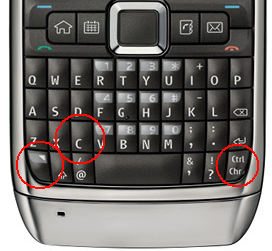
Lucky however, that you don't have to press and hold them at the same time. Fn, then Ctrl, then C/V/X is OK... so you can do it quite easily.
--
[1] Ctrl being Chr/Ctrl or Alt/Strg (on German keyboard) - the key in the very lower right corner
General:
- Press & hold * (star)
Turn on/off Bluetooth... quite handy - Press & hold #(hash)
Should switch between general and silent profile,
but does switch between line #1 and line #2 on mine
I'd have preferred the profile switch...
- Fn-Ctrl-C [1]
Clipboard Copy - Fn-Ctrl-V
Clipboard Paste - Fn-Ctrl-X
Clipboard Cut
But try hitting [Fn] [Ctrl] and [C] (or V or X) at the same time... and still hold the phone in one hand...
Almost impossible... see where those keys are located:

Lucky however, that you don't have to press and hold them at the same time. Fn, then Ctrl, then C/V/X is OK... so you can do it quite easily.
--
[1] Ctrl being Chr/Ctrl or Alt/Strg (on German keyboard) - the key in the very lower right corner
Tuesday, September 08, 2009
E71 usability
Just by accident I noticed that you can select (="mark") elements on a list on the E71 by holding the shift-key while scrolling over the items.... just like on Windows (and others).
Very convenient in the messaging application (SMS, email).
Don't know why I did it... I didn't try on purpose... I guess I just did it, because that's the way it ought to be...
Sad thing is, I noticed only after about a year...
Very convenient in the messaging application (SMS, email).
Don't know why I did it... I didn't try on purpose... I guess I just did it, because that's the way it ought to be...
Sad thing is, I noticed only after about a year...
Saturday, September 05, 2009
Innovation = unintended use
 One excellent example for using a service in a way the creators (of that service) did not have in mind can be found on flickr - the photo community site/service (now owned by Yahoo):
There actually is a group called "Translate Korean -> English" where you can post your picture with any Korean text and some nice flickr members (who speak Korean and English) will add a comment to your picture with the English translation of that text.

A friend of mine needed this service because she owns a Korean (only) washing machine and needed to know how to operate it ...
Cool - isn't it.
And I'm sure that the flickr founders did not think about this - back then.
Monday, August 24, 2009
Friday, August 21, 2009
Nokia support is getting ridiculous
So last time Nokia support told me to "have some patience. The problem should be solved in the near future."
Just a reminder: the problem is to sync the information on the website with the NSU database requires 3-4 weeks or more... preposterous.
Well, this time I asked for the support manager... let's see what (s)he has to say regarding answers like those.
I'm waiting...
--
[1] re-reading this: they actually say (in German) that the problem would (more like) disappear in the near future.
Just a reminder that first, they told me I was too stupid, and then that the website and the NSU database were just not in sync. Now the problem requires a couple of weeks (or possibly months) to be solved...Wir bitten noch mal um etwas Geduld. Das Problem sollte sich naher Zukunft erledigen.[1]
When today after a couple of days I inquired what they exactly mean by "near future" I was told they "could not give me more detailed information. In the near future means 3-4 weeks or more. We ask you for patience".Wir können Ihnen leider keine genauere Auskunft geben. In naher Zukunft bedeutet 3-4 Wochen oder auch mehr.
Wir bitten um Geduld.
Just a reminder: the problem is to sync the information on the website with the NSU database requires 3-4 weeks or more... preposterous.
Well, this time I asked for the support manager... let's see what (s)he has to say regarding answers like those.
I'm waiting...
--
[1] re-reading this: they actually say (in German) that the problem would (more like) disappear in the near future.
Tuesday, August 18, 2009
Still no update...
this is getting boring (for you, dear subscribers/readers probably, too).
There is still no E71 update for me, and asking Nokia Care Center if waiting from Wednesday to Monday is ample time for them to synchronize their web-query and their NSU database, they choose not to answer.
One might think, that Nokia is not under pressure from Apple and Android/G1/HTC/...
There is still no E71 update for me, and asking Nokia Care Center if waiting from Wednesday to Monday is ample time for them to synchronize their web-query and their NSU database, they choose not to answer.
Sunday, August 16, 2009
Does NSU hate me ?
I'm getting the feeling, that the Nokia Software Updater (NSU) hates me.
See what it did on August 16h, 9:34 (a couple of minutes ago):

All I wanted was to update my E71...
See what it did on August 16h, 9:34 (a couple of minutes ago):
All I wanted was to update my E71...
Subscribe to:
Posts (Atom)
 Subscribe